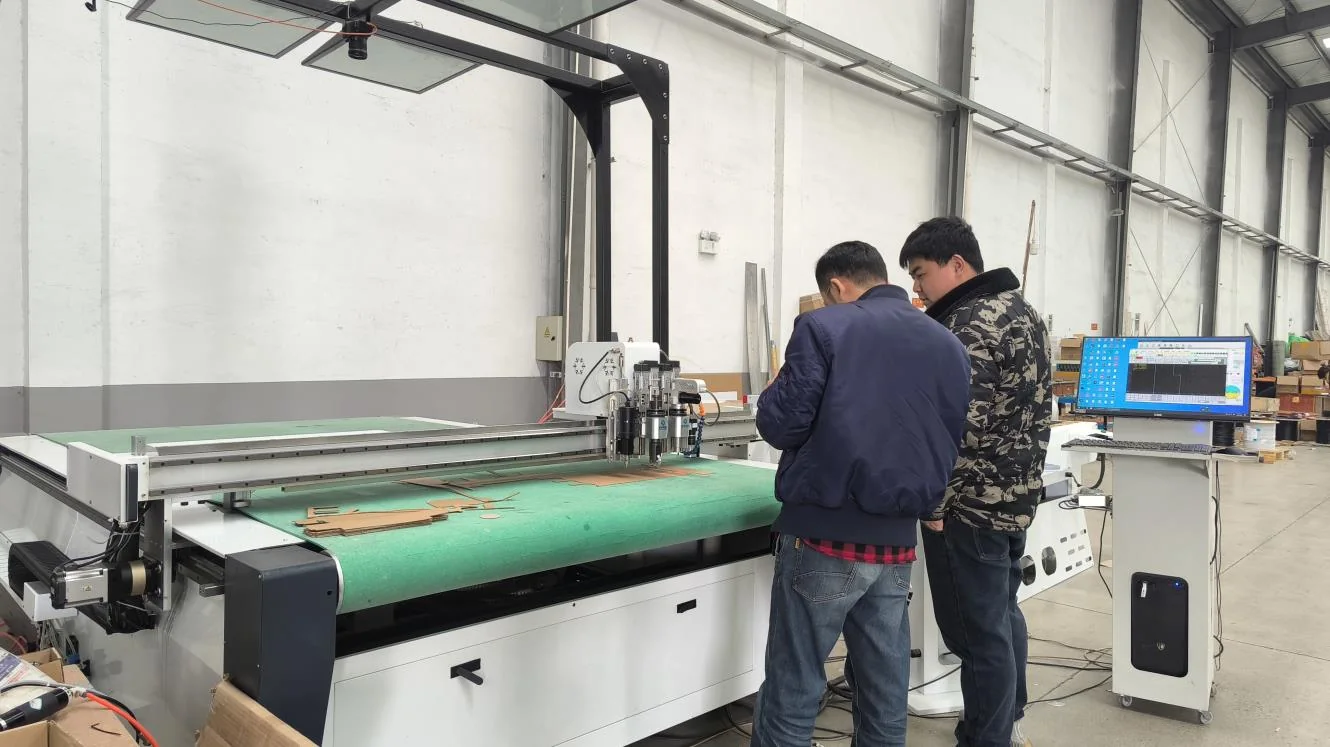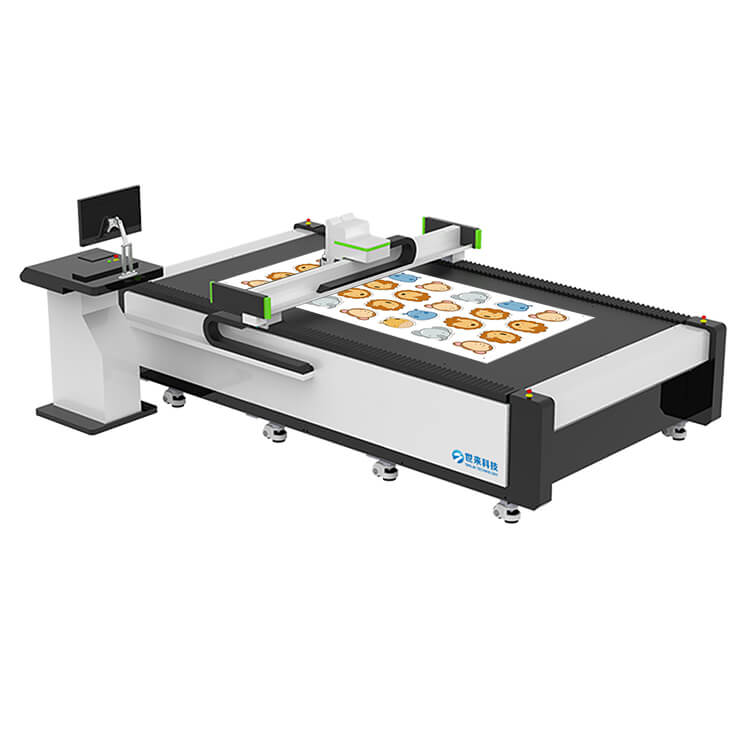
Category: Buying Guides

Checklists and commercial guidance for buying a CNC cutting machine.

  • CNC Cutting Machine RFQ Checklist: 12 Details That Change the Quote

    CNC Cutting Machine RFQ Checklist: 12 Details That Change the Quote

    A short RFQ usually produces a short price and a long list of assumptions. If you want comparable quotations, give every supplier the same project brief and require the same scope in return.

    Use these 12 fields.

    1. Material and grade

    Name the material and, where possible, the supplier and grade. “Rubber” is not enough. “1.5 mm EPDM sheet, 70 Shore A” is a specification.

    2. Thickness range

    Give the minimum and maximum production thickness, not only the sample thickness. The machine and tooling should cover the range.

    3. Sheet or roll size

    State width, length and weight. A roll that is too heavy or wide changes the feeding and loading design.

    4. Largest and smallest part

    The largest part sets the table size. The smallest part tests vacuum hold-down and tool precision.

    5. Drawing and file format

    Attach a DXF, AI, PDF or PLT file. Confirm whether the supplier can open the file without rebuilding the geometry.

    6. Required tolerance

    Specify the critical dimensions and the measurement method. Ask the supplier to state the practical tolerance for the actual material.

    7. Edge quality

    Describe whether the edge is visible, sealed, structural or only functional. A gasket edge and a foam insert face have different requirements.

    8. Daily or monthly output

    Give the number of parts, sheets or metres per shift. This drives the table size, feeding method, tool count and cycle-time target.

    9. Operations required

    List cutting, creasing, V-grooving, punching, marking, kiss-cutting, milling or routing. A machine that does only cutting may not complete the part.

    10. Electrical and destination

    State the country, voltage, frequency, phase and plug. Confirm whether CE or other documentation is required.

    11. Shipping and inspection

    Give the destination port, preferred Incoterm and inspection requirement. Ask for packing dimensions and gross weight.

    12. Support and spare parts

    Ask what is included for installation, training, warranty, spare parts and technical support. Request a recommended first-order consumables list.

    Copy-ready RFQ template

    We need a CNC cutting machine for the following application. Please quote the complete configuration and identify every assumption.

    >

    Material: [grade / supplier]

    Thickness: [min–max]

    Sheet or roll: [width × length, weight]

    Largest part: [size]

    Smallest part: [size]

    Tolerance: [critical dimensions and measurement]

    Edge requirement: [visible / sealed / structural / general]

    Daily output: [parts or metres per shift]

    Operations: [cut / crease / V-groove / punch / mark / kiss-cut / mill]

    Drawing: [attached]

    Destination: [country, port, voltage]

    Inspection:

    Incoterm: [FOB / CIF / other]

    Support: [installation, training, warranty, spares]

    >

    Please include the model, working area, tool list, vacuum, feeding method, software, electrical configuration, packing, lead time and price. Also state what the machine cannot do for this application.

    How to compare the replies

    Create a table with one column per supplier and fill the same fields. Do not compare only the total price.

    Check whether each quote includes:

    • the same table size
    • the same tool set
    • the same vacuum and feeding
    • the same software
    • the same electrical configuration
    • the same packing and freight term
    • the same warranty and spare-parts scope
    • a test on the actual material

    A supplier who answers the RFQ with a specific limitation is often more useful than one who says yes to everything.

    Use the cutting test to turn the RFQ into evidence, or review the machine range.
  • Factory or Trader? How to Verify a CNC Machine Supplier

    Factory or Trader? How to Verify a CNC Machine Supplier

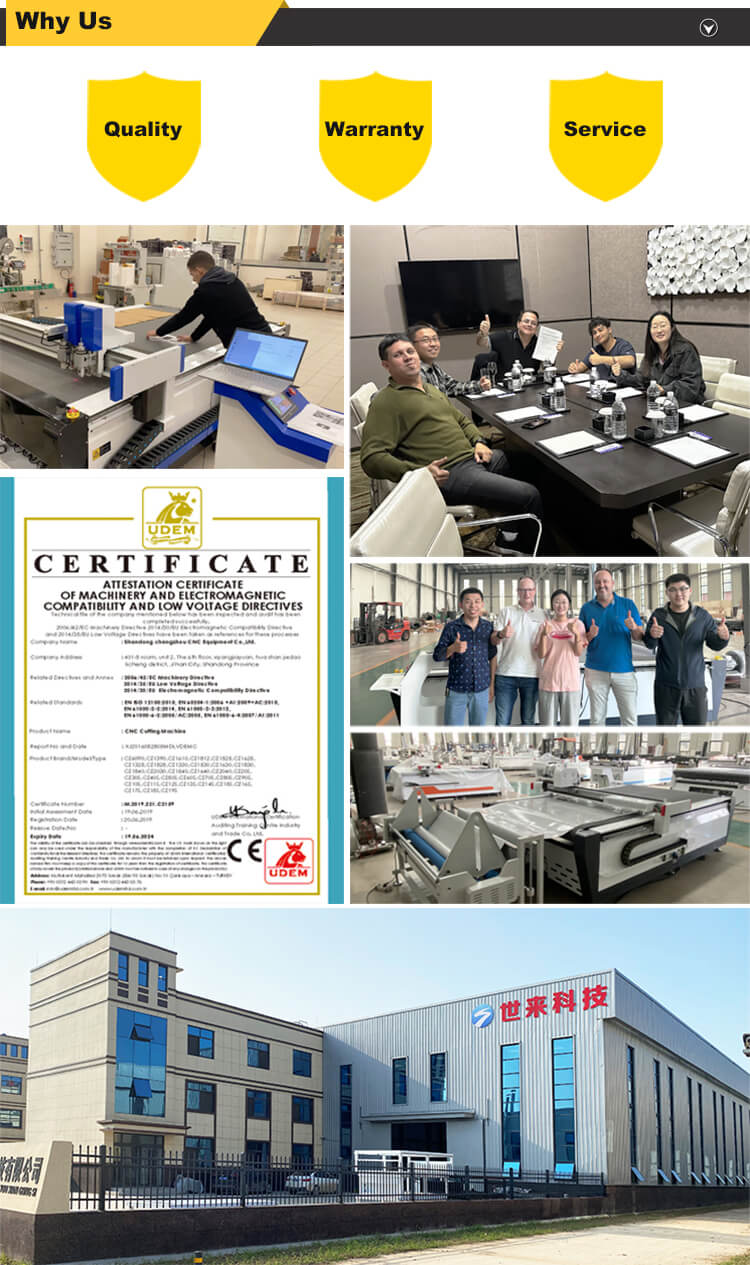
    A supplier can be a factory, a trader, an integrator or a hybrid. The label matters less than the evidence. What the buyer needs to know is who builds the machine, who tests it, who controls the quality record and who supports it after arrival.

    Use this checklist to verify the supplier’s role instead of relying on a homepage claim.

    1. Match the legal entity to the offer

    Ask for:

    • full legal company name
    • registered address
    • factory address
    • bank account name
    • quotation issuer
    • invoice issuer

    The names should be consistent, or the relationship between the entities should be explained. A different bank account is a serious red flag until independently verified.

    2. Ask for a live factory call

    A pre-recorded factory video is a marketing asset. A live call should show:

    • the current production floor
    • employees and work in progress
    • the relevant machine type
    • the assembly and test area
    • the component storage and packing area
    • the certificate documents

    You do not need a cinematic tour. You need to see that the claimed activity is happening.

    3. Trace the build

    Ask the supplier to explain the process from order to shipment:

    1. configuration review
    2. frame and mechanical assembly
    3. electrical and safety
    4. software setup
    5. cutting test
    6. final inspection
    7. packing and documents

    A real builder can explain the checkpoints and who signs them. A catalogue seller may only be able to describe the finished product.

    4. Inspect the component choices

    A machine is more than a model number. Ask about:

    • frame construction
    • servo and drive brand
    • guide rail and rack
    • cable management
    • vacuum pump
    • control system
    • safety devices

    Component brands are evidence, not proof of quality. The integration and testing still matter, but vague claims are weaker than a clear bill of materials.

    5. Ask what the factory does not make

    A transparent supplier will identify the parts or processes that are outsourced. Most machine builders buy motors, controls, rails, pumps and fasteners. The question is whether they control the assembly, configuration, test and support.

    A supplier who claims to manufacture every component is not necessarily more credible. The useful answer is specific.

    6. Verify the certificates

    Check the issuer, certificate number, scope and validity date. Ask whether the exact model and configuration are covered. A certificate for a related product family is not automatically a certificate for the machine being quoted.

    CE and ISO documents are part of the evidence pack, not a replacement for the cutting test.

    7. Request a material test

    Ask for the actual material and drawing. The test should show:

    • the tool selected
    • the feed and oscillation
    • the vacuum zones
    • the number of passes
    • the edge result
    • any limitation

    A supplier who will not test the material is asking the buyer to accept an unverified process.

    8. Check the after-sales route

    Ask:

    • who answers technical questions
    • what languages are supported
    • how spare parts are identified
    • what the warranty covers
    • how installation and training are handled
    • what happens if the machine is down
    • what response time is realistic

    The answer should include names of roles, not just “24/7 support”.

    9. Compare the quotation to the test

    The machine in the quotation should match the machine in the test. If the test used a different tool, table or vacuum setup, ask why. The production machine should be configured around the proven result.

    A practical red-flag list

    Be cautious if the supplier:

    • cannot show the factory or the build process
    • changes the bank account at the last minute
    • gives a price without a specification
    • refuses a sample test
    • claims every material is suitable
    • cannot explain the certificate scope
    • has no clear spare-parts list
    • treats “after-sales” as a promise without a process

    The goal is not to find a perfect company. It is to understand the supplier’s actual role and the evidence behind the offer.

    For a factory walkthrough or a machine-specific discussion, contact Shilai.

  • How to Import a CNC Cutting Machine from China

    How to Import a CNC Cutting Machine from China

    Importing a large CNC machine is a sequence of technical and commercial checks. The machine must be correct, the documents must match and the freight and destination costs must be understood before the balance is paid.

    This guide is a practical checklist. It is not legal or customs advice; the final classification and duties should be confirmed with a qualified broker in the destination country.

    1. Verify the supplier before comparing prices

    Ask for:

    • full legal company name and address
    • factory location and production capability
    • certificate copies with issuer, number, scope and validity
    • Alibaba or other verified company profile
    • live video factory tour
    • machine serial-number process
    • spare-parts and support plan
    • bank account details confirmed through an independent channel

    A trading company can be a legitimate supplier. The buyer’s question is who builds, tests and supports the machine, and whether that is clear in the contract.

    2. Define the machine before asking for the final price

    The quotation should specify:

    • model and working area
    • tool set and blade type
    • vacuum pump and table zoning
    • conveyor or static table
    • electrical configuration
    • software and nesting
    • safety devices
    • documentation language
    • packaging
    • warranty and spare parts

    “Standard machine” is not enough. A standard for one supplier may include options that another treats as extras.

    3. Request a test on the actual material

    The test should be performed at production speed and record the tool, feed, frequency, vacuum zones and number of passes. Ask for physical parts or a clear video and a parameter sheet.

    The test result should be connected to the quotation: the same tool and configuration should appear in the offer.

    4. Confirm the Incoterm and destination

    Common terms include FOB and CIF. They allocate costs differently. Ask the supplier or freight forwarder to explain:

    • who arranges and pays the main freight
    • who buys insurance
    • who handles export clearance
    • who handles destination clearance and delivery
    • what is included in the quoted price
    • what will be invoiced locally

    Do not compare an ex-works price with a delivered price.

    5. Classify the product with a broker

    The HS code and duty rate depend on the machine type and destination. Provide the supplier’s product description, model, function and technical documentation to a qualified customs broker. Do not copy an HS code from an unrelated machine listing.

    6. Plan inspection before shipment

    Options include:

    • video or live cutting test
    • machine configuration check
    • packing photos
    • third-party inspection against a written checklist

    The inspection should confirm the serial number, tool set, voltage, software, accessories and visible condition. A balance payment should be linked to a documented inspection.

    7. Review the packing and container plan

    A CNC table is heavy and can be damaged by poor loading or moisture. Ask about:

    • export-grade packing
    • moisture protection
    • machine anchoring
    • container type and loading plan
    • lifting points
    • unpacking instructions
    • any items shipped separately

    Take photos at arrival before unpacking and report visible damage promptly.

    8. Prepare the document set

    The exact requirements depend on the destination, but a typical set includes:

    • commercial invoice
    • packing list
    • bill of lading or airway bill
    • certificate of origin where applicable
    • CE or other conformity documents
    • insurance certificate where applicable
    • operating manual and spare-parts list

    The names, weights and values should match across documents.

    9. Plan installation and training

    Confirm who will:

    • unload and position the machine
    • check power and grounding
    • connect vacuum and extraction
    • install software
    • run the first cut
    • train the operator
    • handle warranty issues

    Remote support can cover much of the setup, but the buyer still needs a safe site and a responsible local team.

    10. Keep the commercial file

    Store the quotation, order confirmation, test report, inspection record, shipping documents, warranty terms and maintenance log together. This is the evidence trail if a specification or support question appears later.

    For a machine-specific discussion, send the material, drawing and destination through the contact page or start with the cutting test.

  • CNC Cutting Machine Cost: What Changes the Price

    CNC Cutting Machine Cost: What Changes the Price

    A CNC cutting machine price is not a single number attached to a model. It is the sum of a working envelope, tooling, material handling, control options, documentation, packing and freight.

    That is why two quotations for “the same” machine can differ by a large margin. The useful comparison is the scope behind the number.

    The main cost drivers

    Working area

    A larger table needs more frame, rail, rack, vacuum area and shipping space. A 1600 × 2500 mm machine is a different product from a 600 × 900 mm sample cutter, even when both use an oscillating knife.

    Tooling and tool count

    A single oscillating head is cheaper than a configuration with oscillating, rotary, pneumatic, creasing, V-groove, punching or milling tools. Each tool adds mechanical complexity and a different process capability.

    Feeding and automation

    A static table, conveyor, auto-feeder and loading system change the labour model. A conveyor is not just a longer table; it affects the frame, vacuum, control and floor layout.

    Vision and registration

    A CCD camera or leather hide-recognition system adds hardware and software. It is valuable when printed registration, hide defects or nesting yield determine the result. It should be justified by the application, not added because it sounds advanced.

    Vacuum and extraction

    Vacuum pump capacity, zoning, table surface and dust extraction affect performance and price. A machine that cannot hold a small part or control dust is not a bargain.

    Electrical and compliance

    Voltage, frequency, phase, plug, safety devices and CE documentation must match the destination. A quotation that ignores the destination may be incomplete.

    Packing and freight

    Export packing, moisture protection, container loading and Incoterm change the landed cost. Ask for a separate breakdown if you want to compare suppliers.

    What not to compare

    Do not compare a bare machine price with a delivered, configured package. One may include:

    • tool set
    • vacuum table
    • conveyor
    • software
    • spare blades
    • training
    • inspection
    • packing
    • freight
    • certificate copies

    A lower price can simply mean a smaller scope.

    A better quotation template

    Ask every supplier to quote the same fields:

    FieldExample
    Model / platformSL1625FG
    Working area1600 × 2500 mm
    Tool setOscillating knife, blade kit
    FeedingStatic vacuum table
    VacuumZoned pump and table
    SoftwareMachine control + nesting
    Electrical380 V / 50 Hz / 3 phase
    DocumentationManual, CE copy, packing list
    InspectionVideo or live test
    PackingExport packing
    IncotermFOB Shanghai / CIF destination
    Warranty3 years, wear parts excluded
    Spare partsBlade and mat recommendation
    Lead time15 days standard / 30 days custom

    Price versus cost per good part

    The lower purchase price is not always the lower production cost. Consider:

    • scrap from poor nesting
    • rejected parts from an unstable edge
    • labour to re-cut or trim
    • downtime from poor support
    • shipping a table that is too large or too small
    • buying a second machine because the first lacks a required tool

    For a high-value leather or composite application, nesting yield can matter more than a modest machine-price difference. For a simple gasket line, the table size and hold-down may dominate.

    When to ask for a test

    A quote is only meaningful after the process is defined. Send:

    1. material and thickness
    2. drawing or sample
    3. sheet or roll size
    4. daily output
    5. required tolerance
    6. destination country

    Then compare the test result and the priced configuration together. If two suppliers quote different tools, ask why.

    Start with a cutting test or review the machine range.

  • How to Choose a CNC Oscillating Knife Cutting Machine

    How to Choose a CNC Oscillating Knife Cutting Machine

    Most machine comparisons start with the model number. That is the wrong order. A CNC knife cutter is a configuration, not a single product. The table, tooling, feeding, vacuum and software must fit the material and the production flow.

    Use this checklist to compare suppliers on the same basis.

    1. Start with the material, not the industry

    “Packaging” can mean corrugated board, honeycomb, foam, PP hollow sheet or printed labels. “Composite” can mean dry carbon fabric, tacky prepreg, honeycomb core or a cured panel.

    Write down:

    • exact material grade
    • thickness range
    • sheet or roll size
    • surface coating or backing
    • whether the material is stacked, rolled or supplied on a liner
    • required edge quality
    • any heat sensitivity

    A supplier who does not ask these questions is guessing.

    2. Size the table around the largest real part

    The working area should fit the largest sheet or nested marker with handling clearance. An oversized table increases shipping cost and floor-space use; an undersized table limits the order mix.

    Check:

    • standard sheet dimensions in your market
    • largest finished part
    • smallest part and whether vacuum zoning can hold it
    • whether the table needs a conveyor
    • loading and unloading space around the machine

    Custom sizes are possible, but the final design should still be mechanically sensible.

    3. Match the knife to the material

    Oscillating, rotary, drag and pneumatic knives are not interchangeable. The tool changes the edge, the feed, the thickness capability and the maintenance.

    For example, dense EVA may need a 400 W oscillating knife, while softer EPE can need a pneumatic knife. Aramid can require a sharper low-drag tool than fibreglass. A gasket sheet may use a different blade from a thick foam block.

    Ask for the exact tool list in the quotation, not just “cutting tool”.

    4. Decide whether you need more than a knife

    Many jobs require a second operation:

    • creasing wheel for packaging
    • V-groove tool for folded panels and duct board
    • punching tool for holes
    • marking or plotting tool
    • high-speed router for foam cavities
    • kiss-cut tool for labels
    • CCD camera for printed registration

    Each option adds cost and process capability. List the operations you need before comparing prices.

    5. Specify the feeding method

    A static vacuum table is fine for sheets. A conveyor is better for rolls and continuous production. A leather hide may need a large static table and vision; a foam insert may need a smaller table with a router.

    Ask:

    • Can the material be loaded without stretching it?
    • Does the part need support when it leaves the cutting zone?
    • Is the conveyor length sufficient for the real sheet or roll?
    • How is the material aligned or registered?

    6. Understand vacuum and hold-down

    Vacuum is not a checkbox. It must hold the actual material without crushing it or letting it move.

    Ask about:

    • number and layout of vacuum zones
    • pump capacity
    • table surface and sacrificial mat
    • small-part hold-down
    • porous versus non-porous material
    • extraction or filtration for dust

    A small gasket blank and a full foam sheet need different hold-down strategies.

    7. Check the software and file workflow

    A machine is only as useful as the path from design to cut. Confirm the supported files, nesting software, tool-path control and training.

    Typical formats include DXF and PLT, with files prepared in AutoCAD, Illustrator, CorelDRAW, Inkscape or similar software. Ask for a live demonstration using a file supplied by you.

    8. Ask for an evidence pack

    A serious supplier should provide:

    • a sample cut on your material
    • the tool and parameter record
    • a short video of the test
    • the practical tolerance and limitations
    • a priced configuration
    • a lead time and inspection plan
    • a spare-parts list

    “±0.1 mm” without a material and test condition is not enough.

    9. Compare the commercial scope

    The final comparison should include:

    ItemWhy it matters
    Machine and table sizeDefines the production envelope
    Tool setDetermines material and operation capability
    Vacuum and extractionAffects hold-down and dust
    Conveyor or loaderChanges labour and throughput
    SoftwareControls nesting and tool path
    Electrical configurationMust match destination
    DocumentationSupports import and service
    Packing and IncotermChanges landed cost
    Warranty and sparesProtects uptime
    InspectionConfirms the machine before balance

    Red flags

    Be cautious when a supplier:

    • promises one model for every material
    • refuses a sample test on the actual material
    • cannot explain the knife or hold-down choice
    • quotes a price without a specification
    • claims a tolerance without test conditions
    • has no clear spare-parts or support route
    • will not identify what the machine cannot cut

    A good supplier should reduce uncertainty, not create more of it.

    Start with the machine range or send a sample through the cutting test.

  • What Is a CNC Oscillating Knife Cutting Machine?

    What Is a CNC Oscillating Knife Cutting Machine?

    A CNC oscillating knife cutting machine is a digital flatbed cutter that moves a rapidly vibrating blade along a computer-controlled path. The blade travels up and down through the material while the gantry moves it across the table. The result is a cold, die-less cut from a CAD drawing.

    It is not a plotter, a laser or a router. It is a production machine for flexible, fibrous and sheet materials that need a clean edge without heat or a steel die.

    The short answer

    Use an oscillating knife when the material is soft, flexible, layered or fibre-based and the cost of a die is difficult to justify. Typical applications include gasket sheet, leather, foam, composite fabric, cardboard and acoustic felt.

    Do not use it for metal, glass, stone or fully cured rigid laminate. Those materials need a different process.

    How the cut actually happens

    A cutting file defines the outside contour, holes and internal features. The machine control software converts that geometry into a tool path. Vacuum holds the sheet flat while the head follows the path.

    The blade does not simply drag through the material. It oscillates at high frequency, so the cutting edge advances through the material in many small strokes. The oscillation reduces the side load on the material and helps produce a narrow, vertical cut wall.

    Several details determine the result:

    • Tool type: oscillating, rotary, drag or pneumatic knife
    • Blade geometry: length, angle and edge finish
    • Feed rate: how fast the head travels
    • Oscillation frequency: how often the blade strokes
    • Hold-down: vacuum zones, table surface and material support
    • Passes: one pass or several controlled passes
    • Nesting: where the parts sit on the sheet

    A clean edge in one material does not automatically transfer to another. That is why a sample cut is more useful than a general tolerance claim.

    What a CNC oscillating knife machine can cut

    Material familyCommon examplesTypical tool decision
    Gasket sheetGraphite, PTFE, rubber, non-asbestos fibreOscillating or pneumatic knife
    LeatherCowhide, PU, PVC, microfiberOscillating or rotary knife, vision for hides
    FoamEVA, EPE, PU, EPS, XPSOscillating, pneumatic or router
    CompositesCarbon fibre, fibreglass, aramid, prepregOscillating, rotary or drag knife
    PackagingCorrugated, honeycomb, grey boardKnife, crease wheel, V-groove
    TextilesApparel, upholstery, curtain, carpetOscillating or rotary knife
    Acoustic panelsPET felt, polyester fibreKnife, V-tool, punch

    The exact material grade and thickness still matter. Two materials with the same generic name can cut differently because of density, binder, coating or backing.

    Oscillating knife vs laser vs die cutting

    There is no universal winner. The right process depends on the material, geometry and batch size.

    DecisionOscillating knifeLaserDie cutting
    Heat effectNoneCan burn, melt or charNone
    ToolingDigital fileDigital filePhysical die per shape
    Small batchesStrongStrongWeak when die cost dominates
    Complex design changesFastFastNew die or modification
    Thick soft materialStrongLimited by heat and thicknessPossible but tooling-specific
    Very high repeat volumeCompetitive but not always cheapestDepends on materialOften strong once die exists
    Rigid metal or stoneNot suitableSome metalsStamping or different process

    For a deeper comparison, read oscillating knife vs laser cutting. For the economics of short runs, read CNC cutting vs die cutting.

    What the buyer should specify

    A useful RFQ is more than “send me a price for a cutting machine.” Include:

    1. The exact material and supplier
    2. Thickness in millimetres
    3. Sheet or roll dimensions
    4. Largest and smallest part
    5. Required tolerance and edge quality
    6. Daily or monthly output
    7. File format
    8. Destination country and voltage
    9. Whether the material is supplied on a roll, sheet or stack
    10. Whether you need cutting only or also creasing, punching, milling or kiss-cutting

    These details reveal whether the real requirement is a compact table, a conveyor, a dual-head machine, a router, a vision system or a different cutting technology.

    The difference between a machine and a process

    The machine is only one part of the production change. A reliable setup also needs:

    • a clean CAD-to-cut workflow
    • a defined nesting method
    • a material-specific tool selection
    • a vacuum and support plan
    • an operator checklist
    • a maintenance schedule
    • spare blades and wear parts
    • a way to verify a new material before it enters production

    A supplier that can explain those items is more useful than one that only sends a model list.

    A test cut is the fastest way to de-risk the purchase

    Send three A4 pieces of the actual material and one drawing. The test should record the knife, feed, oscillation, vacuum zones and number of passes. You should receive physical cut parts and a clear statement of any limitation.

    If the result is good, the quotation should describe the same tooling and configuration used in the test. If it is not, the supplier should say so before the deposit.

    Start with the Shilai cutting test or compare the machine range.

Chat on WhatsApp